Note
Go to the end to download the full example code.
Cellular automata
There are several
In this section we run some of the cellular automata rules from the book using Python code. Download the code and run it yourself to investigate how these models work.
The domino rule
In Santa Fe, Chris describes the domino rule as follows.

We start by writing code to apply the rule to a binary string.
def apply_domino(string):

    # Convert the strong to cells
    cells=list(map(int, [*string]))
    new_cells=cells.copy()
    N=len(cells)

    # Loop over every cell and update its state based on the neighboring cells
    for j in range(N):
        # Get the neighbors left, above and right.
        # The %N is to take mod, to deal with the edge cases
        left = cells[(j-1)%N]
        above = cells[j]
        right= cells[(j+1)%N]


        # If the cell to the left is a 1 then the cell becomes a 1
        # Otherwise it remains the same.
        if left==1:
            new_cells[j] = 1
        else:
            new_cells[j]=cells[j]

    # Convert back to a new string
    string=''.join([str(item) for item in new_cells])

    return string
Let’s now apply the rule
string='11101100001111000011111111101'
print('Before applying rule: ' + string)
string=apply_domino(string)
print('After applying rule : ' + string)
Before applying rule: 11101100001111000011111111101
After applying rule : 11111110001111100011111111111
We can repeadtedly apply it as follows:
steps = 5
string='11101100001111000011111111101'

for i in range(steps):
    print('Time step %d:'%i + string)
    string=apply_domino(string)


# .. admonition:: Think yourself!
#
#       Look at a starting string with all zeros, apart from one one. Run the
#       cellular automata for enough steps so that all the zeros turn to one.
#       Notice how the domino rally travels from one side to the other.
Time step 0:11101100001111000011111111101
Time step 1:11111110001111100011111111111
Time step 2:11111111001111110011111111111
Time step 3:11111111101111111011111111111
Time step 4:11111111111111111111111111111
The politics rule
Chris goes on to describe a new set of the following three rules.
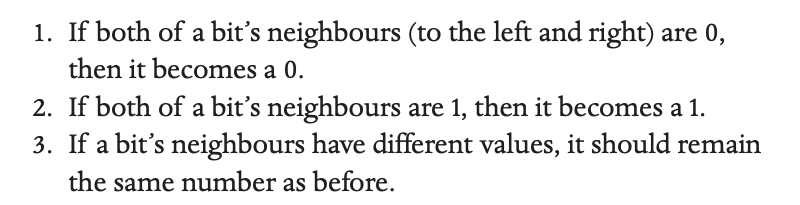
Let’s implement these in Python
def apply_political(string):

    # Convert the strong to cells
    cells=list(map(int, [*string]))
    new_cells=cells.copy()
    N=len(cells)

    # Loop over every cell and update its state based on the neighboring cells
    for j in range(N):
        # Get the neighbors left, above and right.
        # The %N is to take mod, to deal with the edge cases
        left = cells[(j-1)%N]
        above = cells[j]
        right= cells[(j+1)%N]

        # If the cell to the left is a 1 then the cell becomes a 1
        # Otherwise it remains the same.
        if ((left==0) & (right==0)):
            new_cells[j] = 0
        elif ((left==1) & (right==1)):
            new_cells[j] = 1
        else:
            new_cells[j]=cells[j]

    # Convert back to a new string
    string=''.join([str(item) for item in new_cells])

    return string
Let’s now apply the rule
string='0100011011110101011010'
print('Before applying rule: ' + string)
string=apply_political(string)
print('After applying rule : ' + string)
Before applying rule: 0100011011110101011010
After applying rule : 0000011111111010111100
We can repeadtedly apply the rule as follows:
steps = 5
string='0100011011110101011010'

for i in range(steps):
    print('Time step %d:'%i + string)
    string=apply_political(string)

# All the isolated 0's or 1's are replaced
# by their majority neighbours (we assume that the bits form a loop, so
# the 1 on the end of the string has neighbour 0 to its left and adopts its
# right neighbour as the 0 at the start of the string and thus becomes a 0).
Time step 0:0100011011110101011010
Time step 1:0000011111111010111100
Time step 2:0000011111111101111100
Time step 3:0000011111111111111100
Time step 4:0000011111111111111100
The alternate rule
In the book, Esther and I find rules which create alternating lines like these.

Let’s implement these rules in Python.
def apply_alternate(string):

    # Convert the strong to cells
    cells=list(map(int, [*string]))
    new_cells=cells.copy()
    N=len(cells)

    # Loop over every cell and update its state based on the neighboring cells
    for j in range(N):
        # Get the previous value

        above = cells[j]

        # Switch the value of the cell on every time step
        if (above==1):
            new_cells[j] = 0
        else:
            new_cells[j] = 1

    # Convert back to a new string
    string=''.join([str(item) for item in new_cells])

    return string
We can repeadtedly apply the rule as follows:
steps = 20
string='01110111001100110110'


for i in range(steps):
    print(string)
    string=apply_alternate(string)
01110111001100110110
10001000110011001001
01110111001100110110
10001000110011001001
01110111001100110110
10001000110011001001
01110111001100110110
10001000110011001001
01110111001100110110
10001000110011001001
01110111001100110110
10001000110011001001
01110111001100110110
10001000110011001001
01110111001100110110
10001000110011001001
01110111001100110110
10001000110011001001
01110111001100110110
10001000110011001001
The checquerboard rule
Esther and I also found a rule which makes the following pattern.

Let’s look at a Python implementation.
def apply_checquerboard(string):

    # Convert the strong to cells
    cells=list(map(int, [*string]))
    new_cells=cells.copy()
    N=len(cells)

    # Loop over every cell and update its state based on the neighboring cells
    for j in range(N):
        # Get the previous value

        left = cells[(j-1)%N]
        above = cells[j]
        right= cells[(j+1)%N]

        # Switch the value of the cell on every time step
        if (above==1):
            if ((left==1) & (right==1)):
                new_cells[j] = 1
            else:
                new_cells[j] = 0
        else:
            if ((left==0) & (right==0)):
                new_cells[j] = 0
            else:
                new_cells[j] = 1


    # Convert back to a new string
    string=''.join([str(item) for item in new_cells])

    return string
We can repeadtedly apply the rule as follows:
steps = 20
string='10000001110000000011'

for i in range(steps):
    print(string)
    string=apply_checquerboard(string)
10000001110000000011
01000010101000000101
10100101010100001010
01011010101010010101
10100101010101101010
01011010101010010101
10100101010101101010
01011010101010010101
10100101010101101010
01011010101010010101
10100101010101101010
01011010101010010101
10100101010101101010
01011010101010010101
10100101010101101010
01011010101010010101
10100101010101101010
01011010101010010101
10100101010101101010
01011010101010010101
We will look again at these last two rules in the section on cellular chaos where we implement a model which takes a set of rules as input and produces a cellular automata as output.
Total running time of the script: (0 minutes 0.005 seconds)