Note
Go to the end to download the full example code.
Labyrinth factory
This cellular automata was suggested to me by Mikael Hansson, while studying a course with me a few years ago. I think its very nice and makes some impressive patterns so I implemented it her in Python.
import numpy as np
import matplotlib.pyplot as plt
from pylab import rcParams

def show_grid(ax,grid,make_animation):
        N=np.size(grid,1)
        if make_animation:
            frame = ax.imshow(grid, cmap=plt.get_cmap('Blues'), interpolation='nearest',animated=True)
        else:
            frame = ax.imshow(grid, cmap=plt.get_cmap('Blues'), interpolation='nearest')
        ax.spines['top'].set_visible(False)
        ax.spines['right'].set_visible(False)
        ax.spines['left'].set_visible(False)
        ax.spines['bottom'].set_visible(False)
        ax.set_ylim(0,N)
        ax.set_xlim(0,N)
        ax.set_xticks([])
        ax.set_yticks([])
        ax.axis('equal')

        return frame

def iterate(grid,new_value):
    N=np.size(grid,1)
    new_grid = np.zeros((N, N), dtype="int")
    for i in range(N):
        for j in range(N):
            new_grid[i,j]=new_value(i, j,grid)
    return new_grid, grid
In the book I describe transitions between three states:
Bone (0). These become Goo (2) if less than four of their neighbours are bone, otherwise they remain bone.
Goo (2). These become Fluid (1) if less than three of their neighbours are bone, otherwise they remain goo.
Fluid (1). These become Bone (1) if two or more their neighbours are bone, otherwise they remain fluid.
The neighbours are the eight nearest cells.
First we set up the cellular automatawith these rules.
def new_value(i, j, grid):

    #Bone 0 (white)
    #Goo 1 (light blue)
    #Fluid 2 (dark blue)

    neighbours0=0

    #for k in range(3):
    #    neighbours.append([(grid[i, (j-1)%N]==k), (grid[i, (j+1)%N]==k), (grid[(i-1)%N, j]==k), (grid[(i+1)%N, j]==k), (grid[(i-1)%N, (j-1)%N]==k) , (grid[(i-1)%N, (j+1)%N]==k), (grid[(i+1)%N, (j-1)%N]==k) ,(grid[(i+1)%N, (j+1)%N]==k)].count(True))

    for ic in range(i-1,i+2):
        for jc in range(j-1,j+2):
            if not((ic==i) & (jc==j)):
                if grid[ic %N, jc%N]==0:
                    neighbours0=neighbours0+1


    #print(neighbours2)

    # Apply rules
    if grid[i, j]  == 0:
        #Bone/firing
        if (neighbours0>=4):
            return 0
        else:
            return 2

    elif grid[i, j]  == 2:
        #Goo/resting
        if (neighbours0>=3):
            return 2
        else:
            return 1

    elif grid[i, j]  == 1:
        #Fluid/ready
        if neighbours0>=2:
            return 0
        else:
            return 1
Now we simulate the model, running it first for 500 steps and then looking at 16 steps in a row.
rcParams['figure.figsize'] = 20/2.54, 20/2.54

make_animation=0

if not(make_animation):
    N = 100
    STEPS = 1016

    grid = np.random.choice([0, 1,2], size=(N,N), p=[1./3, 1./3, 1./3])

    fig,axs=plt.subplots(4,4)
    count=0
    count2=0
    for i in range(STEPS):
        grid, old_grid = iterate(grid,new_value) # Iterate & swap the two grids
        if (i>=STEPS-16):
            show_grid(axs[count][count2],old_grid,0)
            count=count+1
            if count>=4:
                count2=count2+1
                count=0

    plt.show()
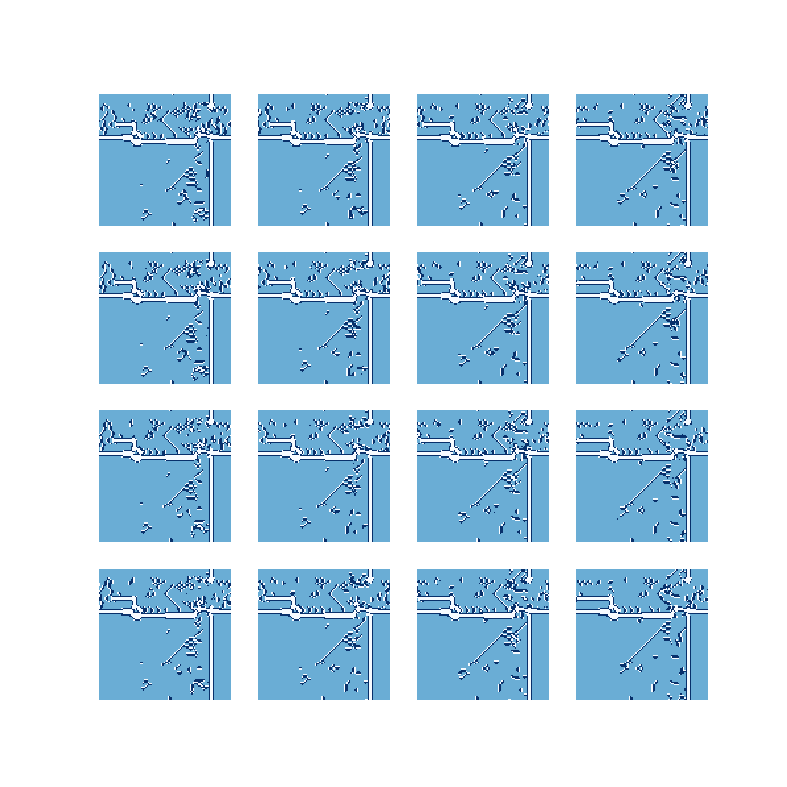
The code below makes a longer video of the model. Change make_animation above to 1 in order to make the video.
N = 200
STEPS = 5000

if make_animation:
    grid = np.random.choice([0, 1, 2], size=(N,N), p=[1./3, 1./3, 1./3])

    img = [] # some array of images
    frames = [] # for storing the generated imagesfig, ax = plt.subplots()
    fig,ax=plt.subplots(1)
    for step in range(STEPS):
        grid, old_grid = iterate(grid,new_value) # Iterate & swap the two grids
        im = show_grid(ax,old_grid,1)
        frames.append([im])


    ani = animation.ArtistAnimation(fig, frames, interval=50, blit=True,
                                repeat_delay=1000)
        # set output file
    writer = animation.FFMpegWriter(fps=15, metadata=dict(artist='Me'), bitrate=1800)
    ani.save("Labyrinth_Factory_movie.mp4", writer=writer)
Here is a video of the output.
Total running time of the script: (0 minutes 31.961 seconds)