Note
Go to the end to download the full example code.
Cellular chaos
Rules for cellular automata
In Santa Fe, Esther shows how to write rule tables for cellular automata.
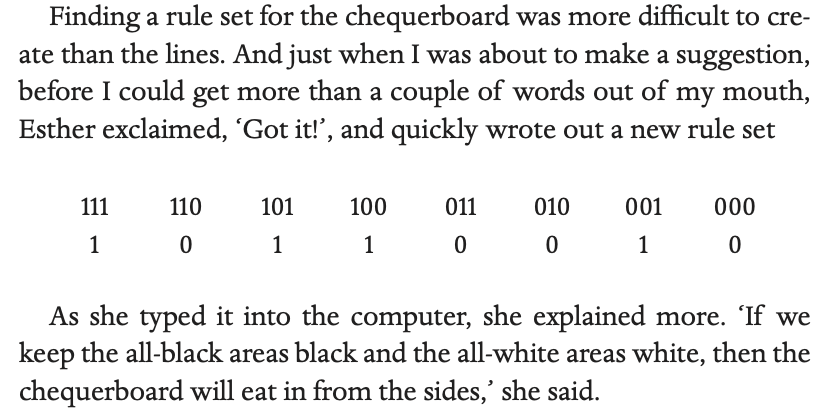
The figure below shows how these rules result in a chequerboard pattern.
The top of the figure shows the rules, then the pattern underneath is each time step of the cellular automata.
On this page we will implement a cellular automata that takes in a set of rules and outputs a pattern.
import numpy as np

def generate_ca(rule, steps, input_string='', size=50,print_output=1):
    # Initialize the list of cells with a single "on" cell in the middle
    if input_string=='':
        cells = [0] * size
        cells[size // 2] = 1
    else:
        cells=list(map(int, [*input_string]))
        size=len(input_string)

    #Store the middle column
    middle_column=[cells[size // 2]]


    # Create a dictionary for mapping inputs to outputs
    patterns = {
        (1, 1, 1): rule[0],
        (1, 1, 0): rule[1],
        (1, 0, 1): rule[2],
        (1, 0, 0): rule[3],
        (0, 1, 1): rule[4],
        (0, 1, 0): rule[5],
        (0, 0, 1): rule[6],
        (0, 0, 0): rule[7]
    }

    # Generate the specified number of steps
    for i in range(steps):
        # Copy the current state of the cells
        new_cells = [0] * size

        # Loop over every cell and update its state based on the neighboring cells
        for j in range(size):
            # Get the pattern of the cell and its neighbors
            if j == 0:
                pattern = (cells[size-1], cells[0], cells[1])
            elif j == size-1:
                pattern = (cells[size-2], cells[size-1], cells[0])
            else:
                pattern = (cells[j-1], cells[j], cells[j+1])

            # Update the cell's state based on the pattern
            new_cells[j] = patterns[pattern]

        string=''.join([str(item) for item in cells])
        if print_output:
            print(string)

        # Update the cells with the new state
        cells = new_cells

        # Update middle column
        middle_column.append(cells[size // 2])

    middle_string = ''.join([str(item) for item in middle_column])

    # Return the final state of the cells
    return middle_string
We can write Esther’s rule in the form of the outputs it produces for a particular input. So ‘1’ when the input is ‘111’, ‘0’ when the input is ‘110’ and so on.
We then run the rule for 30 steps for a single black cell, with all other cells white.
rule = [1, 0, 1, 1, 0, 0, 1, 0]
size = 50
steps = 30

generate_ca(rule, steps,size=size,print_output=1)
00000000000000000000000001000000000000000000000000
00000000000000000000000010100000000000000000000000
00000000000000000000000101010000000000000000000000
00000000000000000000001010101000000000000000000000
00000000000000000000010101010100000000000000000000
00000000000000000000101010101010000000000000000000
00000000000000000001010101010101000000000000000000
00000000000000000010101010101010100000000000000000
00000000000000000101010101010101010000000000000000
00000000000000001010101010101010101000000000000000
00000000000000010101010101010101010100000000000000
00000000000000101010101010101010101010000000000000
00000000000001010101010101010101010101000000000000
00000000000010101010101010101010101010100000000000
00000000000101010101010101010101010101010000000000
00000000001010101010101010101010101010101000000000
00000000010101010101010101010101010101010100000000
00000000101010101010101010101010101010101010000000
00000001010101010101010101010101010101010101000000
00000010101010101010101010101010101010101010100000
00000101010101010101010101010101010101010101010000
00001010101010101010101010101010101010101010101000
00010101010101010101010101010101010101010101010100
00101010101010101010101010101010101010101010101010
01010101010101010101010101010101010101010101010101
10101010101010101010101010101010101010101010101010
01010101010101010101010101010101010101010101010101
10101010101010101010101010101010101010101010101010
01010101010101010101010101010101010101010101010101
10101010101010101010101010101010101010101010101010

'1010101010101010101010101010101'
Creating fractals
In Santa Fe, David finds the following rules, which make a fractal like pattern.
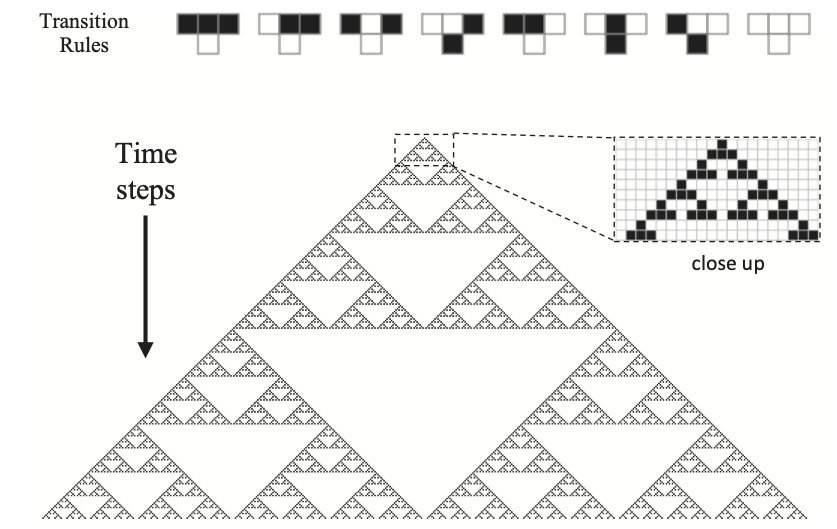
Let’s simulate this rule and we chould get the same pattern.
rule = [0, 0, 0, 1, 0, 1, 1, 0]
size = 50
steps = 30

generate_ca(rule, steps,size=size,print_output=1)
00000000000000000000000001000000000000000000000000
00000000000000000000000011100000000000000000000000
00000000000000000000000100010000000000000000000000
00000000000000000000001110111000000000000000000000
00000000000000000000010000000100000000000000000000
00000000000000000000111000001110000000000000000000
00000000000000000001000100010001000000000000000000
00000000000000000011101110111011100000000000000000
00000000000000000100000000000000010000000000000000
00000000000000001110000000000000111000000000000000
00000000000000010001000000000001000100000000000000
00000000000000111011100000000011101110000000000000
00000000000001000000010000000100000001000000000000
00000000000011100000111000001110000011100000000000
00000000000100010001000100010001000100010000000000
00000000001110111011101110111011101110111000000000
00000000010000000000000000000000000000000100000000
00000000111000000000000000000000000000001110000000
00000001000100000000000000000000000000010001000000
00000011101110000000000000000000000000111011100000
00000100000001000000000000000000000001000000010000
00001110000011100000000000000000000011100000111000
00010001000100010000000000000000000100010001000100
00111011101110111000000000000000001110111011101110
01000000000000000100000000000000010000000000000001
01100000000000001110000000000000111000000000000011
00010000000000010001000000000001000100000000000100
00111000000000111011100000000011101110000000001110
01000100000001000000010000000100000001000000010001
01101110000011100000111000001110000011100000111011

'1100000000000000000000000000000'
Random number generator
The random rule which David discovers is illustrated below.
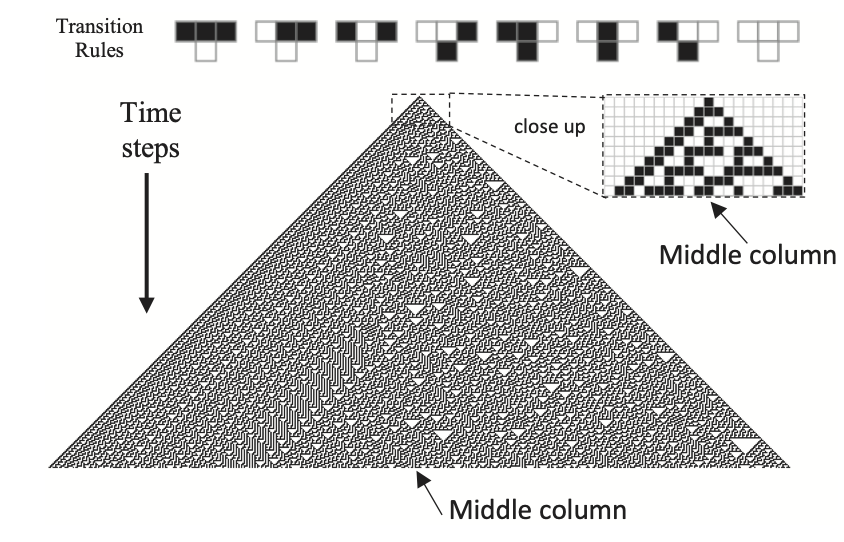
Let’s simulate this now. We use this function to calculate the middle column. The middle string printed below is the column starting at the single 1 in the middle and then going down from there.
rule = [0, 0, 0, 1, 1, 1, 1, 0]
size = 50
steps = 30

middle_string = generate_ca(rule, steps,size=size,print_output=1)

print('\n')
print('The middle string is: ' + middle_string)
00000000000000000000000001000000000000000000000000
00000000000000000000000011100000000000000000000000
00000000000000000000000110010000000000000000000000
00000000000000000000001101111000000000000000000000
00000000000000000000011001000100000000000000000000
00000000000000000000110111101110000000000000000000
00000000000000000001100100001001000000000000000000
00000000000000000011011110011111100000000000000000
00000000000000000110010001110000010000000000000000
00000000000000001101111011001000111000000000000000
00000000000000011001000010111101100100000000000000
00000000000000110111100110100001011110000000000000
00000000000001100100011100110011010001000000000000
00000000000011011110110011101110011011100000000000
00000000000110010000101110001001110010010000000000
00000000001101111001101001011111001111111000000000
00000000011001000111001111010000111000000100000000
00000000110111101100111000011001100100001110000000
00000001100100001011100100110111011110011001000000
00000011011110011010011111100100010001110111100000
00000110010001110011110000011110111011000100010000
00001101111011001110001000110000100010101110111000
00011001000010111001011101101001110110101000100100
00110111100110100111010001001111000100101101111110
01100100011100111100011011111000101111101001000001
01011110110011100010110010000101101000001111100011
01010000101110010110101111001101001100011000010110
11011001101001110100101000111001111010110100110101
00010111001111000111101101100111000010100111100101
10110100111000101100001001011100100110111100011101


The middle string is: 1101110011000101100100111010111
The method to generate random numbers from the cellular automata is to first run a size 20 cellular automata for 20 steps….
rule = [0, 0, 0, 1, 1, 1, 1, 0]
size = 20
steps = 20

middle_string = generate_ca(rule, steps,size=size,print_output=1)

print('\n')
print('The middle string is: ' + middle_string)
00000000001000000000
00000000011100000000
00000000110010000000
00000001101111000000
00000011001000100000
00000110111101110000
00001100100001001000
00011011110011111100
00110010001110000010
01101111011001000111
01001000010111101100
11111100110100001010
10000011100110011010
11000110011101110010
10101101110001001110
10101001001011111000
10101111111010000101
00101000000011001101
11101100000110111001
00001010001100100111


The middle string is: 110111001100010110011
We can then convert the output number to a decimal between 0 and 1.
def string_to_decimal(string):
    # Converts a binary number to a decimal between 0 and 1.

    decimal=np.array(0)
    for i,c in enumerate(list(map(int, [*string]))):
        decimal=decimal + c*np.power(np.array(2, dtype=np.float128),-np.array(i+1, dtype=np.float128))

    return decimal

decimal=string_to_decimal(middle_string)
print('In decimal form this is: %f\n'%decimal)
In decimal form this is: 0.862390
We then rerun the cellular automata with the middle string as input for the first row of the cellular automata to get a new middle string.
middle_string = generate_ca(rule, steps, input_string=middle_string,print_output=1)

print('\n')
print('The middle string is: ' + middle_string)
decimal=string_to_decimal(middle_string)
print('In decimal form this is: %f\n'%decimal)
110111001100010110011
000100111010110101110
001111100010100101001
111000010110111101111
000100110100100001000
001111100111110011100
011000011100001110010
110100110010011001111
000111101111110111000
001100001000000100100
011010011100001111110
110011110010011000001
001110001111110100011
111001011000000110110
100111010100001100100
111100010110011011111
000010110101110010000
000110100101001111000
001100111101111000100
011011100001000101110


The middle string is: 011101011001100100001
In decimal form this is: 0.459366
And then we do the same thing again
middle_string = generate_ca(rule, steps, input_string=middle_string,print_output=1)

print('\n')
print('The middle string is: ' + middle_string)
decimal=string_to_decimal(middle_string)
print('In decimal form this is: %f\n'%decimal)
011101011001100100001
010001010111011110011
011011010100010001110
110010010110111011001
001111110100100010111
111000000111110110100
100100001100000100111
011110011010001111100
110001110011011000010
101011001110010100110
101010111001110111100
101010100111000100011
001010111100101110110
011010100011101000101
010010110110001101101
011110100101011001001
010000111101010111111
011001100001010100000
110111010011010110000
100100011110010101001


The middle string is: 010101011101011000110
In decimal form this is: 0.335299
Now lets repeat this without printing out the whole cellular automata, just collecting up the output numbers in a list.
These numbers are random.
random_decimals=[]
N=100

for i in range(N):
    middle_string = generate_ca(rule, steps, input_string=middle_string,print_output=0)
    random_decimals.append(string_to_decimal(middle_string))

print(random_decimals)
[np.longdouble('0.22155427932739257812'), np.longdouble('0.96866512298583984375'), np.longdouble('0.5232448577880859375'), np.longdouble('0.57942962646484375'), np.longdouble('0.069253444671630859375'), np.longdouble('0.9040737152099609375'), np.longdouble('0.65288639068603515625'), np.longdouble('0.78170680999755859375'), np.longdouble('0.42575311660766601562'), np.longdouble('0.5870189666748046875'), np.longdouble('0.29277658462524414062'), np.longdouble('0.5356082916259765625'), np.longdouble('0.46664476394653320312'), np.longdouble('0.6392779350280761719'), np.longdouble('0.8764891624450683594'), np.longdouble('0.5816555023193359375'), np.longdouble('0.68539714813232421875'), np.longdouble('0.6314625740051269531'), np.longdouble('0.90704345703125'), np.longdouble('0.7872233390808105469'), np.longdouble('0.18255567550659179688'), np.longdouble('0.9692673683166503906'), np.longdouble('0.8707194328308105469'), np.longdouble('0.64197540283203125'), np.longdouble('0.064809322357177734375'), np.longdouble('0.26351451873779296875'), np.longdouble('0.6467213630676269531'), np.longdouble('0.00764560699462890625'), np.longdouble('0.5223331451416015625'), np.longdouble('0.88808536529541015625'), np.longdouble('0.05495929718017578125'), np.longdouble('0.42279291152954101562'), np.longdouble('0.8023777008056640625'), np.longdouble('0.6589818000793457031'), np.longdouble('0.95053863525390625'), np.longdouble('0.05950069427490234375'), np.longdouble('0.83356189727783203125'), np.longdouble('0.500553131103515625'), np.longdouble('0.8604235649108886719'), np.longdouble('0.27106714248657226562'), np.longdouble('0.5050930976867675781'), np.longdouble('0.32344579696655273438'), np.longdouble('0.48664617538452148438'), np.longdouble('0.27047109603881835938'), np.longdouble('0.86630535125732421875'), np.longdouble('0.404453277587890625'), np.longdouble('0.032175540924072265625'), np.longdouble('0.78657054901123046875'), np.longdouble('0.020097255706787109375'), np.longdouble('0.7672266960144042969'), np.longdouble('0.74035739898681640625'), np.longdouble('0.0150737762451171875'), np.longdouble('0.21704530715942382812'), np.longdouble('0.36724615097045898438'), np.longdouble('0.0124359130859375'), np.longdouble('0.7760677337646484375'), np.longdouble('0.9766020774841308594'), np.longdouble('0.022377490997314453125'), np.longdouble('0.88095378875732421875'), np.longdouble('0.1735172271728515625'), np.longdouble('0.7494091987609863281'), np.longdouble('0.198455810546875'), np.longdouble('0.485820770263671875'), np.longdouble('0.070341587066650390625'), np.longdouble('0.05157947540283203125'), np.longdouble('0.8706603050231933594'), np.longdouble('0.6317009925842285156'), np.longdouble('0.9003367424011230469'), np.longdouble('0.6885933876037597656'), np.longdouble('0.25264501571655273438'), np.longdouble('0.9449005126953125'), np.longdouble('0.7481646537780761719'), np.longdouble('0.14751195907592773438'), np.longdouble('0.38930559158325195312'), np.longdouble('0.9141688346862792969'), np.longdouble('0.067779541015625'), np.longdouble('0.023517131805419921875'), np.longdouble('0.0797977447509765625'), np.longdouble('0.7416043281555175781'), np.longdouble('0.22756528854370117188'), np.longdouble('0.35744762420654296875'), np.longdouble('0.17963314056396484375'), np.longdouble('0.5353417396545410156'), np.longdouble('0.18031549453735351562'), np.longdouble('0.84064769744873046875'), np.longdouble('0.8426966667175292969'), np.longdouble('0.9240317344665527344'), np.longdouble('0.102982997894287109375'), np.longdouble('0.1001415252685546875'), np.longdouble('0.9202733039855957031'), np.longdouble('0.35263538360595703125'), np.longdouble('0.30674314498901367188'), np.longdouble('0.220561981201171875'), np.longdouble('0.73335933685302734375'), np.longdouble('0.9126334190368652344'), np.longdouble('0.9164757728576660156'), np.longdouble('0.26765155792236328125'), np.longdouble('0.196552276611328125'), np.longdouble('0.099724292755126953125'), np.longdouble('0.18439149856567382812')]
To see this more clearly, lets make these in to a graph over time of the output numbers.
import matplotlib.pyplot as plt
from pylab import rcParams
import matplotlib
rcParams['figure.figsize'] = 12/2.54, 6/2.54
matplotlib.font_manager.FontProperties(family='Helvetica',size=11)

def formatFigure(ax,N):
    ax.set_ylabel('Number')
    ax.set_xlabel('Step')
    ax.set_ylim((0,1))
    ax.set_xlim((0,N))
    ax.set_xticks(range(0,N+1,10))
    ax.set_yticks(range(0,1,5))
    ax.spines['top'].set_visible(False)
    ax.spines['right'].set_visible(False)

fig,ax=plt.subplots(num=1)
ax.plot(random_decimals, color='black')
formatFigure(ax,N)
plt.show()

And finally let’s make histograms. First for the 100 times we have just run.
rcParams['figure.figsize'] = 12/2.54, 9/2.54

def formatHist(ax,N):
    ax.set_ylim(0,N/5)
    ax.set_xlim(0.049,1.052)
    ax.spines['top'].set_visible(False)
    ax.spines['right'].set_visible(False)
    ax.set_ylabel('')
    ax.set_xlabel('Number')
    ax.set_ylabel('Frequency')
    ax.set_xticks(np.arange(0.1,1.1,step=0.1))
    ax.set_xticklabels(ax.get_xticks(), rotation = 90)
    ax.set_xticklabels(['0.0 to 0.1','0.1 to 0.2','0.2 to 0.3','0.3 to 0.4','0.4 to 0.5','0.5 to 0.6','0.6 to 0.7','0.7 to 0.8','0.8 to 0.9','0.9 to 1.0'])

fig,ax=plt.subplots(num=1)
ax.hist(random_decimals, np.arange(0.0,1.01,0.1), color='orange', edgecolor = 'black',linestyle='-',alpha=0.5, density=False, align='right')
formatHist(ax,N)

plt.show()
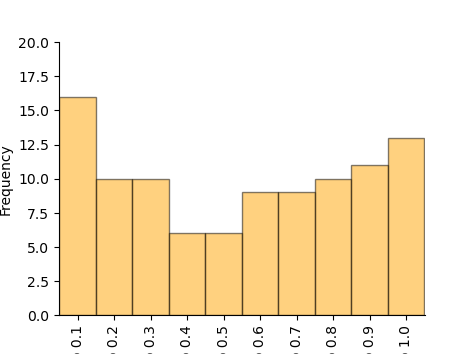
And now let’s repeat it 2000 times to look at the distribtuion.
random_decimals=[]
N=2000

for i in range(N):
    middle_string = generate_ca(rule, steps, input_string=middle_string,print_output=0)
    random_decimals.append(string_to_decimal(middle_string))

fig,ax=plt.subplots(num=1)
ax.hist(random_decimals, np.arange(0.0,1.01,0.1), color='orange', edgecolor = 'black',linestyle='-',alpha=0.5, density=False, align='right')
formatHist(ax,N)

plt.show()
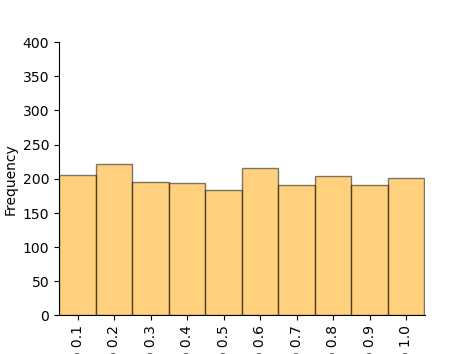
This is a uniform random distribtion of numbers, i.e. all outputs between 0 and 1 are equally likely.
Wolfram’s original paper
The original formaulation of elementary cellular automata was made by Wofram was made in two articles:
Wolfram, Stephen. “Cellular automata as models of complexity.” Nature 311, no. 5985 (1984): 419-424
Here is how Wolfram presented the rule in binary form:

And here are some of the outputs from the model.
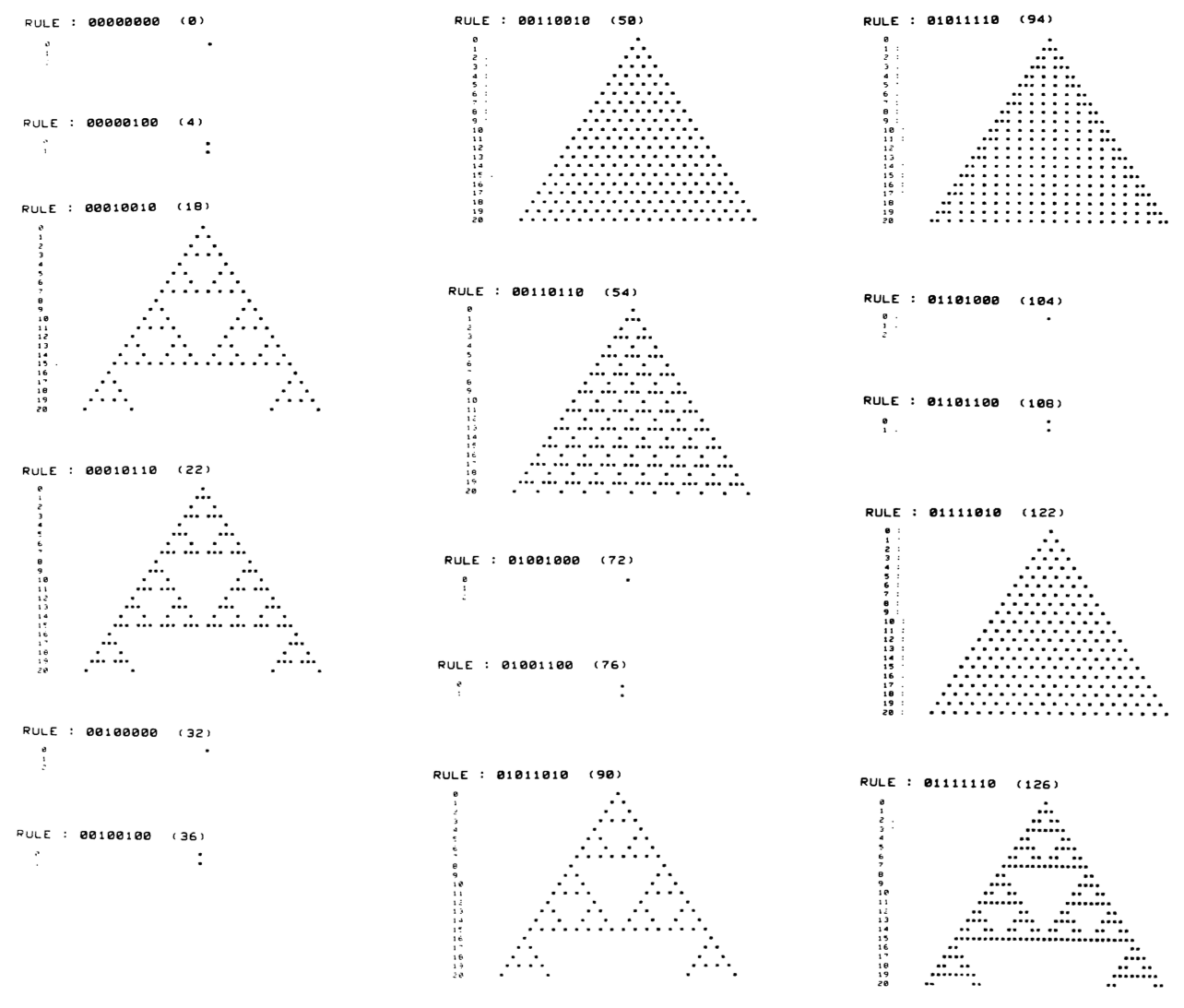
Wolfram introduced the idea of naming each of the elementary cellular automata as a decimal integer between 0 and 255 corresponding to the binary nuber given by the rule set. So, for example, the rule for randomness is 00011110 in binary, which as an integer is 2+4+8+16=30. So we call it rule 30.
The function below makes that conversion.
def rule_to_integer(rule):
    # Converts a binary number to a decimal between 0 and 1.

    integer=np.array(0)
    n = len(rule)
    for i,c in enumerate(rule):
        integer=integer + c*np.power(np.array(2, dtype=np.float128),np.array(n-1-i, dtype=np.float128))

    return int(integer)

rule = [0, 0, 0, 1, 1, 1, 1, 0]
print("As an integer the rule is " + str(rule_to_integer(rule)))
As an integer the rule is 30
Try it yourself!
Another cellular automata which can generate fractals is rule 90. Write 90 in binary form and then run the cellular automate simulator to generate the fractal pattern.
Online simulators
There are several elementary CA simulators available online. For example,
https://devinacker.github.io/celldemo/
allows you to enter rules in binary or integer form and generate their outputs.
Total running time of the script: (0 minutes 0.594 seconds)