Note
Go to the end to download the full example code.
All of the life
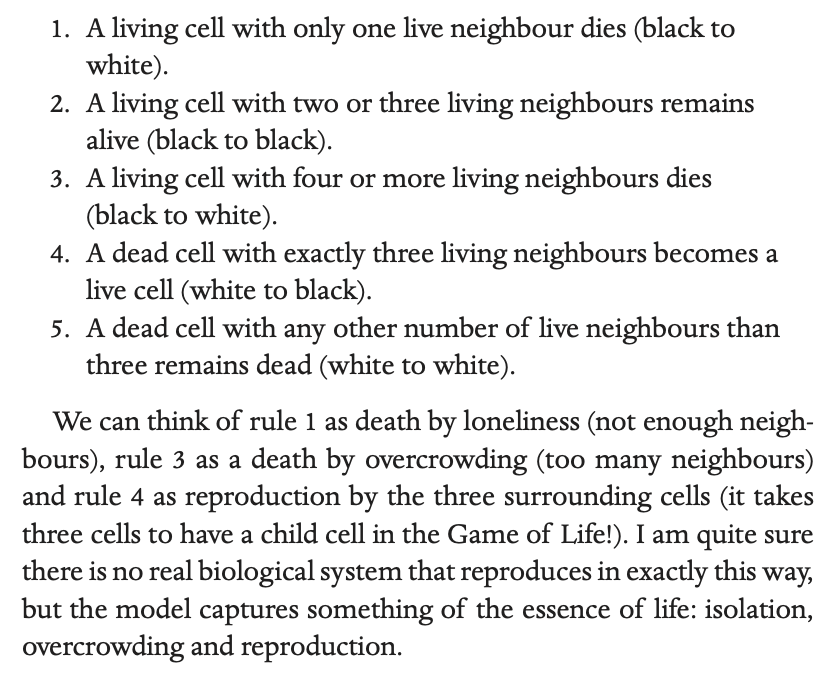
The Game of Life was first introduced by John Conway. The rules are, as I describe in the book,
These simple rules produce a rich variety of patterns. Let’s start with a tour of some of these on Youtube. First, here is an intro to how the rules work.
You can play around yourself with Game of Life using https://playgameoflife.com.
An illustration (starting from a glider) of the types of patterns Game of Life can produce.
A great documentary on building a computer using Game of Life.
This one blows my mind every time I watch it.
Life in Python
In this section we are going to code the Game of Life in Python. First we set up functions which allow us to run sellular automata.
import numpy as np
import numpy as np
import pandas as pd
import matplotlib.pyplot as plt
from pylab import rcParams
rcParams['figure.figsize'] = 12/2.54, 2/2.54

def show_grid(ax,grid,make_animation):
        if make_animation:
            frame = ax.imshow(grid, cmap=plt.get_cmap('Blues'), interpolation='nearest',animated=True)
        else:
            frame = ax.imshow(grid, cmap=plt.get_cmap('Blues'), interpolation='nearest')
        ax.spines['top'].set_visible(False)
        ax.spines['right'].set_visible(False)
        ax.spines['left'].set_visible(False)
        ax.spines['bottom'].set_visible(False)
        ax.set_ylim(0,N)
        ax.set_xlim(0,N)
        ax.set_xticks([])
        ax.set_yticks([])
        ax.axis('equal')

        return frame

def iterate(grid,new_value):
    N=np.size(grid,1)
    new_grid = np.zeros((N, N), dtype="int")
    for i in range(N):
        for j in range(N):
            new_grid[i,j]=new_value(i, j,grid)
    return new_grid, grid
Set up the rules
Now we set up the cellular automata
def new_value(i, j,grid):

    # This identifies the neighbours, accounting for those
    # that might be over the edge of the screen. The screen wraps round.
    neighbours = grid[i, (j-1)%N] + grid[i, (j+1)%N] + grid[(i-1)%N, j] + grid[(i+1)%N, j] +grid[(i-1)%N, (j-1)%N] + grid[(i-1)%N, (j+1)%N] + grid[(i+1)%N, (j-1)%N] + grid[(i+1)%N, (j+1)%N]

    # Apply rules
    if grid[i, j]  == 1:
        if (neighbours < 2) | (neighbours > 3):
            return 0
    else:
        if neighbours == 3:
            return 1

    return grid[i, j]
Simulating a glider
Now we set up the initial shape of the glider.
def initialize(grid):
    init_pattern = ["111",
                    "001",
                    "010"]
    for i, line in enumerate(init_pattern):
        for j, char in enumerate(line):
                grid[i+int(N/2)-2, j+int(N/2)-2] = int(char)
    return grid

N=8

grid = np.zeros((N, N), dtype="int")
grid = initialize(grid)
Now let’s simulate the glider for 10 steps and output the result.
STEPS = 10

fig,axs=plt.subplots(1,STEPS)
for step in range(STEPS):
    grid, old_grid = iterate(grid,new_value) # Iterate & swap the two grids
    show_grid(axs[step],old_grid,0)


plt.show()

Try it yourself!
Change the initial conditions in the simulation above to create the patterns I show in the book.

Make a video
Animate the game of life on a larger grid. Creates a video file in the directory you run this code (uncomment last two lines)
import matplotlib.animation as animation

rcParams['figure.figsize'] = 12/2.54, 12/2.54

make_animation=0

N=40
STEPS = 400


if make_animation:
    grid = np.random.choice([0, 1], size=(N,N), p=[1./3, 2./3])

    img = [] # some array of images
    frames = [] # for storing the generated imagesfig, ax = plt.subplots()
    fig,ax=plt.subplots(1)
    for step in range(STEPS):
        grid, old_grid = iterate(grid) # Iterate & swap the two grids
        im = show_grid(ax,old_grid,1)
        frames.append([im])


    ani = animation.ArtistAnimation(fig, frames, interval=50, blit=True,
                                repeat_delay=1000)

    # set output file
    # UNCOMMENT THIS TO MAKE VIDEO
#    writer = animation.FFMpegWriter(fps=15, metadata=dict(artist='Me'), bitrate=1800)
#    ani.save("Game_of_life_movie.mp4", writer=writer)
Here is a video of the output of this function.
Total running time of the script: (0 minutes 0.124 seconds)